(UPDATE Aug 2012 - I have removed images that won't display correctly but will leave the text here as reference)
Term One 2009 Session 2
http://en.wikipedia.org/wiki/Screen_resolution
"The display resolution of a digital television or computer display typically refers to the number
of distinct pixels in each dimension that can be displayed. It can be an ambiguous term especially
as the displayed resolution is controlled by all different factors in cathode ray tube (CRT)
and flat panel or projection displays using fixed picture-element (pixel) arrays.
One use of the term "display resolution" applies to fixed-pixel-array displays such as plasma
display panels (PDPs), liquid crystal displays (LCDs), digital light processing (DLP) projectors,
or similar technologies, and is simply the physical number of columns and rows of pixels
creating the display (e.g., 1280×1024). A consequence of having a fixed grid display is that
for multiformat video inputs all displays need a "scaling-engine" (a digital video processor that
includes a memory array) to match the incoming picture format to the display.
Note that the use of the word resolution here is misleading. The term "display resolution" is
usually used to mean pixel dimensions (e.g., 1280×1024), which does not tell anything about
the resolution of the display on which the image is actually formed (which would typically be
given in pixels per inch (digital) or number of lines measured horizontally, per picture height (analog))."
Below are some examples of various resolutions eg PAL (Normal TV) 768x576 pixels
For lots about printers try
http://en.wikipedia.org/wiki/Printer_(computing)
Wednesday, February 25, 2009

Wednesday, February 18, 2009


Wednesday, November 19, 2008
Term 4 Session 5 "Rule of Thirds", Night Photography
(UPDATE Aug 2012 - I have removed images that won't display correctly but will leave the text here as reference)
Rule of thirds from term 3
Rule of thirds from term 3
We Talked about how to photograph small things ..
Wednesday, November 12, 2008
Term 4 Session 4 SLR's and Digicams, "F" numbers, Depth of field, Exposure Compensation
(UPDATE Aug 2012 - I have removed images that won't display correctly but will leave the text here as reference)
Much of my additional information comes
from the internet reference
site called "Wikipedia" which is at http://en.wikipedia.org/wiki/Main_Page
If you like the resource you may think about donating towards the upkeep of this site.
Wikipedia (pronunciation )is a free,[5]multilingual encyclopedia project supported
by the non-profit Wikimedia Foundation. Its name is a portmanteau of the words wiki
(a technology for creating collaborative websites) and encyclopedia.Wikipedia's
10 million articles have been written collaboratively by volunteers
around the world, and almost all of its articles can be edited by anyone who can access the Wikipedia website.[6]
Launched in 2001 by Jimmy Wales and Larry Sanger,[7]it is currently the largest and most popular[1] general reference work on the Internet.[8][9][10]
Parallax Error
Parallax is an apparent displacement or
difference of orientation of an object
viewed along two different lines of sight, and is measured by the angle
or semi-angle of
inclination between those two lines

Digital single-lens reflex camera.
http://en.wikipedia.org/wiki/Digital_single-lens_reflex_camera
A digital
single-lens reflex camera
(digital SLR or DSLR) is a digital camera that uses
a mechanical mirror system and pentaprism to direct light from the lens to an optical
viewfinder on the back of the camera.


Compact
digital still camera
http://en.wikipedia.org/wiki/Digital_Camera
F-number
http://en.wikipedia.org/wiki/F_stop
In optics, the f-number
(sometimes called focal
ratio, f-ratio, or relative aperture[1]) of an optical system expresses
the diameter of the entrance pupil in terms of the focal length of the lens; in simpler terms,
the f-number is the focal length divided by the "effective" aperture
diameter.
It is a dimensionless
number that is
a quantitative measure of lens speed,
an important concept in photography.


Depth of field
http://en.wikipedia.org/wiki/Depth_of_Field
In optics, particularly as it relates
to film and photography, the depth of field (DOF) is the portion of a scene
that appears sharp
in the image. Although a lens can precisely focus at only one
distance, the decrease in
sharpness is gradual on either side of the focused distance, so that
within the DOF, the
unsharpness is imperceptible under normal viewing conditions.
NB.These pictures are also courtesy of Wikipedia
 F22 = Very deep field

F2.8 Very shallow field

At f/32,
the background is distracting.

At f/5.6,
the flowers are isolated from the background.

Metering mode
http://en.wikipedia.org/wiki/Metering_mode
In photography,
the metering
mode refers to
the way in which a
camera determines the exposure.
Exposure compensation
http://en.wikipedia.org/wiki/Exposure_compensation
Exposure compensation
is a technique for adjusting the exposure indicated by a photographic
exposure
meter, in
consideration of factors that may cause the indicated exposure to
result in
a less-than-optimal image. Factors considered may include unusual
lighting distribution,
variations within a camera system, filters, non-standard processing,
or intended underexposure or overexposure. Cinematographers may also
apply exposure
compensation for changes in shutter
angle or film speed, among other factors.
Much of my additional information comes
from the internet reference
site called "Wikipedia" which is at http://en.wikipedia.org/wiki/Main_Page
If you like the resource you may think about donating towards the upkeep of this site.
Wikipedia (pronunciation
 )is a free,[5]multilingual encyclopedia project supported
by the non-profit Wikimedia Foundation. Its name is a portmanteau of the words wiki
(a technology for creating collaborative websites) and encyclopedia.Wikipedia's
10 million articles have been written collaboratively by volunteers
around the world, and almost all of its articles can be edited by anyone who can access the Wikipedia website.[6]
Launched in 2001 by Jimmy Wales and Larry Sanger,[7]it is currently the largest and most popular[1] general reference work on the Internet.[8][9][10]
Parallax Error
Parallax is an apparent displacement or
difference of orientation of an object
viewed along two different lines of sight, and is measured by the angle
or semi-angle of
inclination between those two lines

Digital single-lens reflex camera.
http://en.wikipedia.org/wiki/Digital_single-lens_reflex_camera
A digital
single-lens reflex camera
(digital SLR or DSLR) is a digital camera that uses
a mechanical mirror system and pentaprism to direct light from the lens to an optical
viewfinder on the back of the camera.

Compact
digital still camera
http://en.wikipedia.org/wiki/Digital_Camera


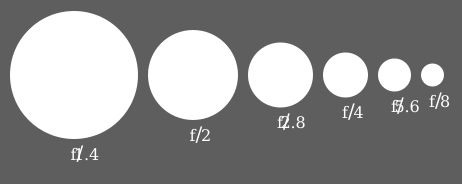
F-number
http://en.wikipedia.org/wiki/F_stop
In optics, the f-number
(sometimes called focal
ratio, f-ratio, or relative aperture[1]) of an optical system expresses
the diameter of the entrance pupil in terms of the focal length of the lens; in simpler terms,
the f-number is the focal length divided by the "effective" aperture
diameter.
It is a dimensionless
number that is
a quantitative measure of lens speed,
an important concept in photography.
Depth of field
http://en.wikipedia.org/wiki/Depth_of_Field
In optics, particularly as it relates
to film and photography, the depth of field (DOF) is the portion of a scene
that appears sharp
in the image. Although a lens can precisely focus at only one
distance, the decrease in
sharpness is gradual on either side of the focused distance, so that
within the DOF, the
unsharpness is imperceptible under normal viewing conditions.
NB.These pictures are also courtesy of Wikipedia
 F22 = Very deep field
F2.8 Very shallow field

At f/32,
the background is distracting.

At f/5.6,
the flowers are isolated from the background.
Metering mode
http://en.wikipedia.org/wiki/Metering_mode
In photography,
the metering
mode refers to
the way in which a
camera determines the exposure.
Exposure compensation
http://en.wikipedia.org/wiki/Exposure_compensation
Exposure compensation
is a technique for adjusting the exposure indicated by a photographic
exposure
meter, in
consideration of factors that may cause the indicated exposure to
result in
a less-than-optimal image. Factors considered may include unusual
lighting distribution,
variations within a camera system, filters, non-standard processing,
or intended underexposure or overexposure. Cinematographers may also
apply exposure
compensation for changes in shutter
angle or film speed, among other factors.
Wednesday, November 5, 2008
Term 4 Session 3: Factors When Buying a Digital Camera.
(UPDATE Aug 2012 - I have removed images that won't display correctly but will leave the text here as reference)
Remember when your looking at a digital camera it's a lot more than just the megapixels.
Major factors to look at are the lens, processor, software (firmware), build quality, brand reputation. For more factors check out this link to my reference site:
http://home.people.net.au/~james.bell/J01_photoref.html#S03
this has more links about this topic below the mind map.
Please report any links you may find, that don't work, to me so I can fix them.
This article seems worth reading........
Factors to Consider when Choosing a Digital SLR Camera
http://photo.net/equipment/choosing-a-dslr-camera/ <== follow this link for more.
"The newcomer to the world of Digital SLR cameras is presented with a bewildering array of options. It’s hard to keep track of exactly who is currently making DSLRs and how many models each have, but as of summer 2008 there were at least 9 manufacturers (Canon, Fuji, Leica, Nikon, Olympus, Panasonic, Pentax, Samsung and Sony) and between them there were something like 34 different models.
How do you choose which one to buy, and in what ways are they different? With so many different cameras available and new models being announced every few months it’s not really possible to make specific recommendations on which one is "best". The term "best" will depend on many factors unique to the user. However, I will attempt to outline the various factors that you might want to take into account when deciding which one to purchase."
Digital Zoom
This is the DP Review link about Digital Zoom really worth the look
http://www.dpreview.com/learn/?/Glossary/Digital_Imaging/Digital_zoom_01.htm
It's clear from the picture that digital zoom is not helping at all.


It's no clearer ... just bigger and your computer can do that!
----------------------------------------------------------------------------------------------------------------------------------
White Balance
http://www.dpreview.com/learn/?/Glossary/Digital_Imaging/White_Balance_01.htm
"Most digital cameras also allow you to choose a white balance manually,
typically sunlight, cloudy, fluorescent, incandescent etc. Prosumer and
SLR digital cameras allow you to define your own white balance
reference. Before making the actual shot, you can focus at an area in
the scene which should be white or neutral gray, or at a white or gray
target card. The camera will then use this reference when making the
actual shot."
1.. 2..
2..
1)The auto white balance was unable to find a white reference, resulting in dull and artificial colors.
2)The auto white balance got it right this time in a very similar scene
because it could use the clouds as its white reference.
------------------------------------------------------------------------------------------------------------------------------------------
A&R at Charlestown had this one that looked interesting.
------------------------------------------------------------------------------------------------------------------------------
FlexPod
This flex pod may not be quite the quality of a GorillaPod but was only $29 at Myers.
The original GorillaPod is at http://www.joby.com/products/gorillapod/original/
and it only weighs 45 grams.
The original GorillaPod (below)available from NDF is at
http://www.joby.com/products/gorillapod/original/
and it only weighs 45 grams.
Remember when your looking at a digital camera it's a lot more than just the megapixels.
Major factors to look at are the lens, processor, software (firmware), build quality, brand reputation. For more factors check out this link to my reference site:
http://home.people.net.au/~james.bell/J01_photoref.html#S03
this has more links about this topic below the mind map.
Please report any links you may find, that don't work, to me so I can fix them.
This article seems worth reading........
Factors to Consider when Choosing a Digital SLR Camera
http://photo.net/equipment/choosing-a-dslr-camera/ <== follow this link for more.
"The newcomer to the world of Digital SLR cameras is presented with a bewildering array of options. It’s hard to keep track of exactly who is currently making DSLRs and how many models each have, but as of summer 2008 there were at least 9 manufacturers (Canon, Fuji, Leica, Nikon, Olympus, Panasonic, Pentax, Samsung and Sony) and between them there were something like 34 different models.
How do you choose which one to buy, and in what ways are they different? With so many different cameras available and new models being announced every few months it’s not really possible to make specific recommendations on which one is "best". The term "best" will depend on many factors unique to the user. However, I will attempt to outline the various factors that you might want to take into account when deciding which one to purchase."
Digital Zoom
This is the DP Review link about Digital Zoom really worth the look
http://www.dpreview.com/learn/?/Glossary/Digital_Imaging/Digital_zoom_01.htm
It's clear from the picture that digital zoom is not helping at all.
It's no clearer ... just bigger and your computer can do that!
----------------------------------------------------------------------------------------------------------------------------------
White Balance
http://www.dpreview.com/learn/?/Glossary/Digital_Imaging/White_Balance_01.htm
"Most digital cameras also allow you to choose a white balance manually,
typically sunlight, cloudy, fluorescent, incandescent etc. Prosumer and
SLR digital cameras allow you to define your own white balance
reference. Before making the actual shot, you can focus at an area in
the scene which should be white or neutral gray, or at a white or gray
target card. The camera will then use this reference when making the
actual shot."
1..
2..1)The auto white balance was unable to find a white reference, resulting in dull and artificial colors.
2)The auto white balance got it right this time in a very similar scene
because it could use the clouds as its white reference.
------------------------------------------------------------------------------------------------------------------------------------------
A&R at Charlestown had this one that looked interesting.
------------------------------------------------------------------------------------------------------------------------------
FlexPod
This flex pod may not be quite the quality of a GorillaPod but was only $29 at Myers.
The original GorillaPod is at http://www.joby.com/products/gorillapod/original/
and it only weighs 45 grams.
The original GorillaPod (below)available from NDF is at
http://www.joby.com/products/gorillapod/original/
and it only weighs 45 grams.
Blogged with the Flock Browser
Saturday, October 25, 2008
Term 4 Session 2: Megapixels & Digital Colour
(UPDATE Aug 2012 - I have removed images that won't display correctly but will leave the text here as reference)
Relative size of the various megapixel images. Note that the 5 megapixel image is about
four times the size of the 1.3Megapixel image but that the 5 megapixel image is nowhere near
twice the size of the 3.3 Megapixel image.

If you have a 1.3 megapixel camera that take a top image size of 1280 x 960 pixels...
divide by 300; 1280 divided by 300= 4.26, and 960 divided by 300= 3.2.
So technically, that 1.3 megapixel camera can produce a
"photo quality" photo at 300ppi of 4.26 by 3.2 inches.
A 2.1 megapixel camera will generally produce an image around 1600 x 1200 pixels in size.
(1600 divided by 300 is 5.3 and 1200 divided by 300 is 4 ....
so a 1600 x 1200 makes a 5.3" x 4" 300 dpi print)
A 3.3 megapixel camera will generally produce an image around 2048 x 1536
A 5 megapixel camera will give you an image size in the neighborhood of 2560 x 1920 pixels
(2560 divided by 300 is 8.5 and 1920 divided by 300 is 6.4 ....
so a 2560 x 1920 makes a 8.5" x 6.4" 300 dpi print)

http://upload.wikimedia.org/wikipedia/commons/c/ca/Video_Standards.svg
Image Compression ...... In order to store digital pictures economically, the image data is
compressed. However, compression often causes a reduction in picture quality.
Image Compression ...... reduction of the amount of data required to represent an image.
This is accomplished by encoding the spatial and contrast information.
Image Compression ...... minimizes the file size (in bytes) of an image.
Two of the most common compressed image formats are JPEG and GIF. ...
1bit image ie. black or white

4 bit image 16 usable colours only

8 bit image 256 usable colours only

24 bit image 16,777,216 usable colours only

added together in various ways to reproduce a broad array of colors.
The name of the model comes from the initials of the three additive primary colors,
red, green, and blue.

A representation of additive color mixing. Projection of primary color lights on a
screen shows secondary colors where two overlap; the combination of
all three of red, green, and blue in appropriate intensities makes white.
Relative size of the various megapixel images. Note that the 5 megapixel image is about
four times the size of the 1.3Megapixel image but that the 5 megapixel image is nowhere near
twice the size of the 3.3 Megapixel image.
If you have a 1.3 megapixel camera that take a top image size of 1280 x 960 pixels...
divide by 300; 1280 divided by 300= 4.26, and 960 divided by 300= 3.2.
So technically, that 1.3 megapixel camera can produce a
"photo quality" photo at 300ppi of 4.26 by 3.2 inches.
A 2.1 megapixel camera will generally produce an image around 1600 x 1200 pixels in size.
(1600 divided by 300 is 5.3 and 1200 divided by 300 is 4 ....
so a 1600 x 1200 makes a 5.3" x 4" 300 dpi print)
A 3.3 megapixel camera will generally produce an image around 2048 x 1536
A 5 megapixel camera will give you an image size in the neighborhood of 2560 x 1920 pixels
(2560 divided by 300 is 8.5 and 1920 divided by 300 is 6.4 ....
so a 2560 x 1920 makes a 8.5" x 6.4" 300 dpi print)

http://upload.wikimedia.org/wikipedia/commons/c/ca/Video_Standards.svg
Image Compression ...... In order to store digital pictures economically, the image data is
compressed. However, compression often causes a reduction in picture quality.
Image Compression ...... reduction of the amount of data required to represent an image.
This is accomplished by encoding the spatial and contrast information.
Image Compression ...... minimizes the file size (in bytes) of an image.
Two of the most common compressed image formats are JPEG and GIF. ...
1bit image ie. black or white

4 bit image 16 usable colours only

8 bit image 256 usable colours only

24 bit image 16,777,216 usable colours only

RGB color model
http://en.wikipedia.org/wiki/RGB_color_model
The RGB color model is an additive color model in which red, green, and blue light areadded together in various ways to reproduce a broad array of colors.
The name of the model comes from the initials of the three additive primary colors,
red, green, and blue.

A representation of additive color mixing. Projection of primary color lights on a
screen shows secondary colors where two overlap; the combination of
all three of red, green, and blue in appropriate intensities makes white.
Blogged with the Flock Browser
Wednesday, October 22, 2008
Term 4 Session 1 Card Readers, Resolution
(UPDATE Aug 2012 - I have removed images that won't display correctly but will leave the text here as reference)
Sections in ITALICS are copied directly from the web site at the link above them. ie. click on
the link to read the full article and find more information.
A USB Card Reader

http://en.wikipedia.org/wiki/Photograph
"Non-digital photographs are produced with a two-step chemical process. In the two-step process the light-sensitive film captures a negative image (colors and lights/darks are inverted). To produce a positive image, the negative is most commonly transferred ('printed') onto photographic paper. Printing the negative onto transparent film stock is used to manufacture motion picture films."
digital photography
"The advent of the microcomputer and digital photography has led to the rise of digital prints. These prints are created from stored graphic formats such as JPEG, TIFF, and RAW. The types of printers used include inkjet printers, dye-sublimation printer, laser printers, and thermal printers. Inkjet prints are sometimes given the coined name "Giclée"."
"Digital photography is a form of photography that utilizes digital technology to make digital images of subjects. Until the advent of digital technology, photography used photographic film to create images which could be made visible by photographic processing. Digital images can be displayed, printed, stored, manipulated, transmitted, and archived using digital and computer techniques, without chemical processing.
The main difference between the digital and analog is that digital must have a certain number of
steps or gradations but an analog representation has an infinitely fine number of steps and as such
should be able to produce a finer gradation.
As an example in a digital vs analog photo containing the sun the digital print will usually just be
smooth white but the analog may show some detail.
http://en.wikipedia.org/wiki/Pixel
"In digital imaging, a pixel (picture element[1]) is the smallest piece of information in an image.
Pixels are normally arranged in a regular 2-dimensional grid, and are often represented using
dots, squares, or rectangles. Each pixel is a sample of an original image, where more samples
typically provide a more accurate representation of the original. The intensity of each pixel is
variable; in color systems, each pixel has typically three or four components such as
red, green, and blue, or cyan, magenta, yellow, and black."

"This example shows an image with a portion greatly enlarged, in which the individual
pixels are rendered as little squares and can easily be seen."

"A photograph of sub-pixel display elements on a laptop's LCD screen"
That is to say the red, green and blue bar work together to make one pixel

"A pixel does not need to be rendered as a small square. This image shows alternative
ways of reconstructing an image from a set of pixel values, using dots, lines, or smooth filtering."
![]()
![]()
Sections in ITALICS are copied directly from the web site at the link above them. ie. click on
the link to read the full article and find more information.
A USB Card Reader

http://en.wikipedia.org/wiki/Photograph
"Non-digital photographs are produced with a two-step chemical process. In the two-step process the light-sensitive film captures a negative image (colors and lights/darks are inverted). To produce a positive image, the negative is most commonly transferred ('printed') onto photographic paper. Printing the negative onto transparent film stock is used to manufacture motion picture films."
digital photography
"The advent of the microcomputer and digital photography has led to the rise of digital prints. These prints are created from stored graphic formats such as JPEG, TIFF, and RAW. The types of printers used include inkjet printers, dye-sublimation printer, laser printers, and thermal printers. Inkjet prints are sometimes given the coined name "Giclée"."
"Digital photography is a form of photography that utilizes digital technology to make digital images of subjects. Until the advent of digital technology, photography used photographic film to create images which could be made visible by photographic processing. Digital images can be displayed, printed, stored, manipulated, transmitted, and archived using digital and computer techniques, without chemical processing.
Digital photography is one of several forms of digital imaging. Digital images are also created by non-photographic equipment such as computer tomography scanners and radio telescopes. Digital images can also be made by scanning conventional photographic images."
The main difference between the digital and analog is that digital must have a certain number of
steps or gradations but an analog representation has an infinitely fine number of steps and as such
should be able to produce a finer gradation.
As an example in a digital vs analog photo containing the sun the digital print will usually just be
smooth white but the analog may show some detail.
http://en.wikipedia.org/wiki/Pixel
"In digital imaging, a pixel (picture element[1]) is the smallest piece of information in an image.
Pixels are normally arranged in a regular 2-dimensional grid, and are often represented using
dots, squares, or rectangles. Each pixel is a sample of an original image, where more samples
typically provide a more accurate representation of the original. The intensity of each pixel is
variable; in color systems, each pixel has typically three or four components such as
red, green, and blue, or cyan, magenta, yellow, and black."

"This example shows an image with a portion greatly enlarged, in which the individual
pixels are rendered as little squares and can easily be seen."

"A photograph of sub-pixel display elements on a laptop's LCD screen"
That is to say the red, green and blue bar work together to make one pixel

"A pixel does not need to be rendered as a small square. This image shows alternative
ways of reconstructing an image from a set of pixel values, using dots, lines, or smooth filtering."
Blogged with the Flock Browser
Subscribe to:
Posts (Atom)