Wednesday, November 19, 2008

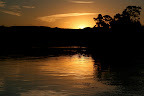
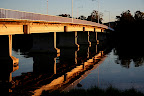
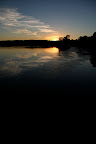
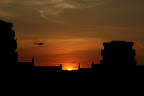
Term 4 Session 5 "Rule of Thirds", Night Photography

(UPDATE Aug 2012 - I have removed images that won't display correctly but will leave the text here as reference)
Rule of thirds from term 3
We Talked about how to photograph small things ..

Wednesday, November 12, 2008

Term 4 Session 4 SLR's and Digicams, "F" numbers, Depth of field, Exposure Compensation

(UPDATE Aug 2012 - I have removed images that won't display correctly but will leave the text here as reference)
Much of my additional information comes
from the internet reference

site called "Wikipedia" which is at http://en.wikipedia.org/wiki/Main_Page

If you like the resource you may think about donating towards the upkeep of this site.

Wikipedia (pronunciation Spoken content icon)is a free,[5]multilingual encyclopedia project supported
by the non-profit Wikimedia Foundation. Its name is a portmanteau of the words wiki
(a technology for creating collaborative websites) and encyclopedia.Wikipedia's
10 million articles have been written collaboratively by volunteers
around the world, and almost all of its articles can be edited by anyone who can access the Wikipedia website.[6]
Launched in 2001 by Jimmy Wales and Larry Sanger,[7]it is currently the largest and most popular[1] general reference work on the Internet.[8][9][10]


Parallax Error
Parallax is an apparent displacement or
difference of orientation of an object

viewed along two different lines of sight, and is measured by the angle
or semi-angle of

inclination between those two lines


Digital single-lens reflex camera.


http://en.wikipedia.org/wiki/Digital_single-lens_reflex_camera


A
digital
single-lens reflex camera

(
digital SLR or DSLR) is a digital camera that uses

a mechanical mirror system and
pentaprism to direct light from the lens to an optical

viewfinder on the back of the camera.


Image:SLR cross section.svg


Compact
digital still camera

http://en.wikipedia.org/wiki/Digital_Camera
A digital camera
(or digicam for short) is a camera
that takes video or still

photographs, or both, digitally
by recording images via an electronic image sensor.


Front and back of a Canon PowerShot A95.


Many compact digital still
cameras can record sound and moving video
as well as still

photographs. In the Western market, digital
cameras outsell their 35 mm
film
counterparts.[1]


F-number
http://en.wikipedia.org/wiki/F_stop
In optics, the f-number

(sometimes called
focal
ratio
, f-ratio, or relative aperture[1]) of an optical system expresses


the diameter of the
entrance pupil in terms of the focal length of the lens; in simpler terms,

the f-number is the focal length divided by the "effective"
aperture
diameter.

It is a dimensionless
number
that is
a quantitative measure of
lens speed,

an important concept in
photography.
Image:Aperture diagram.svg


Depth of field

http://en.wikipedia.org/wiki/Depth_of_Field
In optics, particularly as it relates

to
film and photography, the depth of field (DOF) is the portion of a scene
that appears sharp

in the image. Although a
lens can precisely focus at only one
distance, the decrease in

sharpness is gradual on either side of the focused distance, so that
within the DOF, the

unsharpness is imperceptible under normal viewing conditions.


NB
.These pictures are also courtesy of Wikipedia
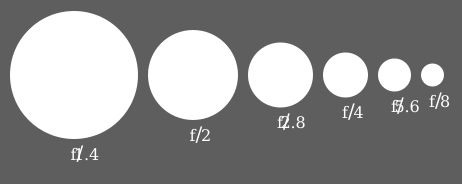
F22 = Very deep field


F2.8 Very shallow field


At f/32,
the background is distracting.


At f/5.6,
the flowers are isolated from the background.


Metering mode
http://en.wikipedia.org/wiki/Metering_mode
In photography,

the
metering
mode
refers to
the way in which a
camera determines the exposure.


Exposure compensation


http://en.wikipedia.org/wiki/Exposure_compensation


Exposure compensation

is a technique for adjusting the
exposure indicated by a photographic

exposure
meter
, in
consideration of factors that may cause the indicated exposure to
result in

a less-than-optimal image. Factors considered may include unusual
lighting distribution,

variations within a camera system, filters, non-standard processing,

or intended
underexposure or overexposure. Cinematographers may also
apply exposure

compensation for changes in
shutter
angle
or film speed, among other factors.

Wednesday, November 5, 2008

Term 4 Session 3: Factors When Buying a Digital Camera.

(UPDATE Aug 2012 - I have removed images that won't display correctly but will leave the text here as reference)

Remember when your looking at a digital camera it's a lot more than just the megapixels.
Major factors to look at are the lens, processor, software (firmware), build quality, brand reputation. For more factors check out this link to my reference site:
http://home.people.net.au/~james.bell/J01_photoref.html#S03
this has more links about this topic below the mind map.
Please report any links you may find, that don't work, to me so I can fix them.


This article seems worth reading........

Factors to Consider when Choosing a Digital SLR Camera


http://photo.net/equipment/choosing-a-dslr-camera/ <== follow this link for more.
"The newcomer to the world of Digital SLR cameras is presented with a bewildering array of options. It’s hard to keep track of exactly who is currently making DSLRs and how many models each have, but as of summer 2008 there were at least 9 manufacturers (Canon, Fuji, Leica, Nikon, Olympus, Panasonic, Pentax, Samsung and Sony) and between them there were something like 34 different models.
How do you choose which one to buy, and in what ways are they different? With so many different cameras available and new models being announced every few months it’s not really possible to make specific recommendations on which one is "best". The term "best" will depend on many factors unique to the user. However, I will attempt to outline the various factors that you might want to take into account when deciding which one to purchase."


Digital Zoom
This is the DP Review link about Digital Zoom really worth the look
http://www.dpreview.com/learn/?/Glossary/Digital_Imaging/Digital_zoom_01.htm
It's clear from the picture that digital zoom is not helping at all.

It's no clearer ... just bigger and your computer can do that!
----------------------------------------------------------------------------------------------------------------------------------
White Balance
http://www.dpreview.com/learn/?/Glossary/Digital_Imaging/White_Balance_01.htm
"Most digital cameras also allow you to choose a white balance manually,
typically sunlight, cloudy, fluorescent, incandescent etc. Prosumer and
SLR digital cameras allow you to define your own white balance
reference. Before making the actual shot, you can focus at an area in
the scene which should be white or neutral gray, or at a white or gray
target card. The camera will then use this reference when making the
actual shot."

1.. 2..
1)The auto white balance was unable to find a white reference, resulting in dull and artificial colors.
2)The auto white balance got it right this time in a very similar scene
because it could use the clouds as its white reference.
------------------------------------------------------------------------------------------------------------------------------------------
A&R at Charlestown had this one that looked interesting.

------------------------------------------------------------------------------------------------------------------------------
FlexPod
This flex pod may not be quite the quality of a GorillaPod but was only $29 at Myers.
The original GorillaPod is at http://www.joby.com/products/gorillapod/original/
and it only weighs 45 grams.


The original GorillaPod (below)available from NDF is at
 http://www.joby.com/products/gorillapod/original/

and it only weighs 45 grams.

Blogged with the Flock Browser

Saturday, October 25, 2008

Term 4 Session 2: Megapixels & Digital Colour

(UPDATE Aug 2012 - I have removed images that won't display correctly but will leave the text here as reference)


Relative size of the various megapixel images. Note that the 5 megapixel image is about
four times the size of the 1.3Megapixel image but that the 5 megapixel image is nowhere near
twice the size of the 3.3 Megapixel image.
http://i210.photobucket.com/albums/bb41/Jim_Bell_of_Belmont/ImageSizes.jpg
If you have a 1.3 megapixel camera that take a top image size of 1280 x 960 pixels...
divide by 300;   1280 divided by 300= 4.26, and 960 divided by 300= 3.2. 
So technically, that 1.3 megapixel camera can produce a
"photo quality" photo at 300ppi of 4.26 by 3.2 inches.


A 2.1 megapixel camera will generally produce an image around 1600 x 1200 pixels in size.
(1600 divided by 300 is 5.3 and 1200
divided by 300 is 4 ....
so a 1600 x 1200 makes a 5.3" x 4" 300 dpi print)


A 3.3 megapixel camera will generally produce an image around  2048 x 1536

A 5 megapixel camera will give you an image size in the neighborhood of 2560 x 1920 pixels
(2560 divided by 300 is 8.5 and 1920 divided by 300 is 6.4 ....
so a
2560 x 1920 makes a 8.5" x 6.4"  300 dpi print)

Image:Video Standards.svg

http://upload.wikimedia.org/wikipedia/commons/c/ca/Video_Standards.svg


Image Compression ......  In order to store digital pictures economically, the image data is
compressed. However, compression often causes a reduction in picture quality.


Image Compression ...... reduction of the amount of data required to represent an image.
This is accomplished by encoding the spatial and contrast information.
Image Compression ...... minimizes the file size (in bytes) of an image.
Two of the most common compressed image formats are JPEG and GIF. ...


1bit image ie. black or white
1 bit

4 bit image 16 usable colours only
4 bits

8 bit image 256 usable colours only

8 bits

24 bit image 16,777,216 usable colours only
Truecolor (24+ bits)

RGB color model

http://en.wikipedia.org/wiki/RGB_color_model

The RGB color model is an additive color model in which red, green, and blue light are
added together in various ways to reproduce a broad array of colors.
The name of the model comes from the initials of the three additive primary colors,
red, green, and blue.

Image:RGB illumination.jpg
A representation of additive color mixing. Projection of primary color lights on a
screen shows secondary colors where two overlap; the combination of
all three of red, green, and blue in appropriate intensities makes white.
Blogged with the Flock Browser

Wednesday, October 22, 2008

Term 4 Session 1 Card Readers, Resolution

(UPDATE Aug 2012 - I have removed images that won't display correctly but will leave the text here as reference)

Sections in ITALICS are copied directly from the web site at the link above them. ie. click on
the link to read the full article and find more information.


A USB Card Reader
A USB Card Reader like this one, will typically implement the USB mass storage device class.


http://en.wikipedia.org/wiki/Photograph
"Non-digital photographs are produced with a two-step chemical process. In the two-step process the light-sensitive film captures a
negative image (colors and lights/darks are inverted). To produce a positive image, the negative is most commonly transferred ('printed') onto photographic paper. Printing the negative onto transparent film stock is used to manufacture motion picture films."

digital photography
"The advent of the microcomputer and digital photography has led to the rise of digital prints. These prints are created from stored graphic formats such as JPEG, TIFF, and RAW. The types of printers used include inkjet printers, dye-sublimation printer, laser printers, and thermal printers. Inkjet prints are sometimes given the coined name "Giclée"."

"Digital photography
is a form of photography that utilizes digital technology to make digital images of subjects. Until the advent of digital technology, photography used photographic film to create images which could be made visible by photographic processing. Digital images can be displayed, printed, stored, manipulated, transmitted, and archived using digital and computer techniques, without chemical processing.
Digital photography is one of several forms of digital imaging. Digital images are also created by non-photographic equipment such as computer tomography scanners and radio telescopes. Digital images can also be made by scanning conventional photographic images."


The main difference between the digital and analog is that digital must have a certain number of
steps or gradations but an analog representation has an infinitely fine number of steps and as such
should be able to produce a finer gradation.
As an example in a digital vs analog photo containing the sun the digital print will usually just be
smooth white but the analog may show some detail.


http://en.wikipedia.org/wiki/Pixel

"In digital imaging, a pixel (picture element[1]) is the smallest piece of information in an image.
Pixels are normally arranged in a regular 2-dimensional grid, and are often represented using
dots, squares, or rectangles. Each pixel is a
sample of an original image, where more samples
typically provide a more accurate representation of the original. The
intensity of each pixel is
variable; in color systems, each pixel has typically three or four components such as

red, green, and blue, or cyan, magenta, yellow, and black."

This example shows an image with a portion greatly enlarged, in which the individual pixels are rendered as little squares and can easily be seen.
"This example shows an image with a portion greatly enlarged, in which the individual
pixels are rendered as little squares and can easily be seen."

A photograph of sub-pixel display elements on a laptop's LCD screen
"A photograph of sub-pixel display elements on a laptop's LCD screen"
That is to say the red, green and blue bar work together to make one pixel

A pixel does not need to be rendered as a small square.  This image shows alternative ways of reconstructing an image from a set of pixel values, using dots, lines, or smooth filtering.
"A pixel does not need to be rendered as a small square. This image shows alternative
ways of reconstructing an image from a set of pixel values, using dots, lines, or smooth filtering."


Blogged with the Flock Browser

Wednesday, September 17, 2008

Term 3 Session 7 Importing using Picasa

(UPDATE Aug 2012 - I have removed images that won't display correctly but will leave the text here as reference)

To get the most out of using Picasa you can sign up for Google ... simply go to

https://www.google.com/accounts/NewAccount
and you can create an account .. try signing up with a user name made up by combining:

" your name" + "of" + "your suburb" (eg. bellfamilyofbelmont) it's easy to remember and
easy to explain to people .. that's where "picasaweb.google.com/bellfamilyofbelmont"
comes from.

Once you have your account It's not too much trouble to use Picasa to upload to the internet.

Remember you really only want to put up pictures that you don't mind
others looking at because the internet is, after all, a public place.

That said Google does allow you to set levels of permissions on the photo's

Read more at http://picasa.google.com/support/bin/answer.py?answer=39496&topic=10760

"Album Properties: Edit

Print
You can change the title, date, description, place taken, and privacy settings of your Picasa
Web Albums account at any time. Just follow these steps:
  1. Log in to Picasa Web Albums at http://picasaweb.google.com using your Google Account username and password.
  2. Select the album you'd like to edit.
  3. Click Edit in the top navigation bar and choose 'Album properties.'
  4. Update your album.
  5. Click Save Changes when you're finished."
and also at http://picasa.google.com/support/bin/answer.py?answer=39501&topic=10872

"Emailing Invitations: Sharing albums and photos

Print
To share your Picasa Web Albums with friends, you can send them invitations to view your albums. On any page in your Web Albums, click the Share button at the top of the page. Then, you can send an email message with a link to that selected gallery, album, or photo. The email message will be sent from your Google Account for Gmail.
If you're sharing a photo from an unlisted album, your recipient will be able to see your entire album, but they will not be able to view other unlisted albums.
If you'd like a copy of the email to be sent to your email account, select the checkbox labeled 'Send me a copy of this email.'"
What this means is that you can have a relatively private Album and then send people emails to view
it instead of "spamming" them with big pictures.


What is this EXIF stuff ?

http://en.wikipedia.org/wiki/Exchangeable_image_file_format
Exchangeable image file format (Exif) is a specification for the image file format used by digital cameras. The specification uses the existing JPEG, TIFF Rev. 6.0, and RIFF WAV file formats, with the addition of specific metadata tags. It is not supported in JPEG 2000, PNG, or GIF.

Using Picasa .. if your not sure check out http://picasa.google.com/support/
there really is a lot of help on line


one example of Picasa help is ....

http://picasa.google.com/support/bin/answer.py?answer=13532&ctx=sibling&topic=9342

Importing Basics: About the Picasa Media Detector

Print
The Picasa Media Detector alerts you that new photos are available for import when you connect your camera to your computer using USB, place a memory card in a card reader, or place a photo CD in your CD ROM device. The Media Detector appears as a small Picasa icon in the Windows System Tray (the area with small icons directly next to where Windows displays the Time), and it launches automatically when you start Windows. Windows XP has its own media detection process, so in most cases you will not need to run the Picasa Picture Manager in XP.
Here's some more ... http://picasa.google.com/support/bin/topic.py?topic=9342
==================================================

Happy Snapping .... next session ... Paint.net


http://www.getpaint.net/
you will also need to get and install .Net click on this link to do that

http://www.microsoft.com/downloads/details.aspx?FamilyID=ab99342f-5d1a-413d-8319-81da479ab0d7
Paint.NET is an open source, raster graphics editing program for Windows,
developed on the .NET Framework. Originally created as a Washington State University
student project, Paint.NET has evolved from a simple replacement for the Microsoft Paint
program, which is included with Windows, into a powerful editor with support for layers,
blending, transparency, and plugins. It is often used as a free alternative to Adobe Photoshop.
It is available under the MIT License [2].

Tuesday, September 2, 2008

Term 3 Session 5 Exposure Value, Rule of Thirds, Software, "Stop Motion" vs "Motion Blurred"

(UPDATE Aug 2012 - I have removed images that won't display correctly but will leave the text here as reference)
Exposure Value
In photography, exposure value (EV) denotes all combinations of camera shutter speed and relative aperture that give the same exposure.
Exposure Compensation is a feature of a camera that allows you to adjust the exposure measured by its light meter. Usually, the range of adjustment goes from +2 to -2 EV in 1/3 steps.
This means that you can adjust the exposure measured by the light meter by telling the camera to allow more light in (positive exposure compensation) or to allow less light in (negative exposure compensation).


Exposure Value examples ... For a full view click on each picture
    
3 Pictures .. Exposure Value +/- 0.0 ;  -1.0 ; +1.0
all taken at 1/125sec @ f8


This day was extremely overcast so the overexposed picture (dark one) still
does not have a lot of sky detail.

Rule of thirds

The rule of thirds is a compositional rule of thumb in photography and other visual arts such as painting and design.[1] The rule states that an image can be divided into nine equal parts by two equally-spaced horizontal lines and two equally-spaced vertical lines. The four points formed by the intersections of these lines can be used to align features in the photograph. Proponents of this technique claim that aligning a photograph with these points creates more tension, energy and interest in the photo than simply centering the feature would. http://en.wikipedia.org/wiki/Rule_of_thirds

 
This photograph of a sunset taken in the Thousand Islands region demonstrates the principles of the rule of thirds


Once again a cloudy overcast day .. but at least I was there!!!

1/80 @ f5.6 EV -1.67       1/8 @ f9.0 EV 0.0          1/2 @ f18 EV 0.0
Fast shutter speed, short exposure Slow shutter speed, long exposure
Fast shutter speed, short exposure         Slow shutter speed, long exposure

http://www.shortcourses.com/use/using2-3.html
Fantastic shot!
Motion in a scene can be frozen or blurred depending on the shutter speed and other factors. Blur can be used creatively to evoke a feeling of motion as in this shot of a waterfall in Yosemite National Park.


This program works quite well and is completely free ...
... if you like the way it works you could ... if you wanted to ... pay for the full version ...
... most people I know have not bothered and I've not heard of any problems ...
... this is the antivirus I use myself.

AVG Free
Wikipedia says:
"AVG is an umbrella term for a range of antivirus and internet security software for the Microsoft Windows, Linux, and FreeBSD computing platforms, developed by AVG Technologies.

According to AVG Technologies, over 70 million users have AVG Anti-Virus protection, including users of the Free Edition. On April 24, 2008, AVG released AVG Anti-Virus Free Edition 8.0. Along with a more colorful interface, the new program added some new features - a combined Anti-Virus and Anti-Spyware protection engine, LinkScanner Search-Shield safe search protection, plus the AVG Security Toolbar - which were previously only available in AVG commercial versions."

Basic antivirus and antispyware protection for Windows available to download for free. Limited features, no support, for private and non-commercial use only.
http://www.grisoft.com/ww.product-avg-anti-virus-free-edition
http://free.avg.com/ww.download?prd=afe
http://free.avg.com/ww.homepage